Managing Bucket Settings
Learn how to manage bucket-level settings on KloudBean S3 to improve control, security, and operational safety.
Overview
Object Deletion Protection (Object Lock)
When you create a new bucket in KloudBean S3 storage, Object Deletion Protection is enabled by default.
This default is designed to prevent unintentional or accidental data loss.
Because deleted objects cannot be restored on current KloudBean S3 (no bucket versioning support), this lock acts as a critical safety guardrail.
Why This Is Enabled by Default
Object Lock is enabled by default to reduce high-impact mistakes such as:
- Accidental manual deletion from the dashboard
- Deletion by automation scripts with incorrect filters
- Bulk-delete operations against wrong object paths
- Operational mistakes during migrations or cleanup tasks
Keeping object deletion locked helps protect production assets, customer uploads, backups, and logs from irreversible loss.
Accessing Bucket Object Lock Settings
To control object lock settings:
- Open your target bucket in Object Storage Administration.
- Go to Settings.
- Locate Object Deletion Protection.
- Use the Object Lock toggle to enable or disable protection.
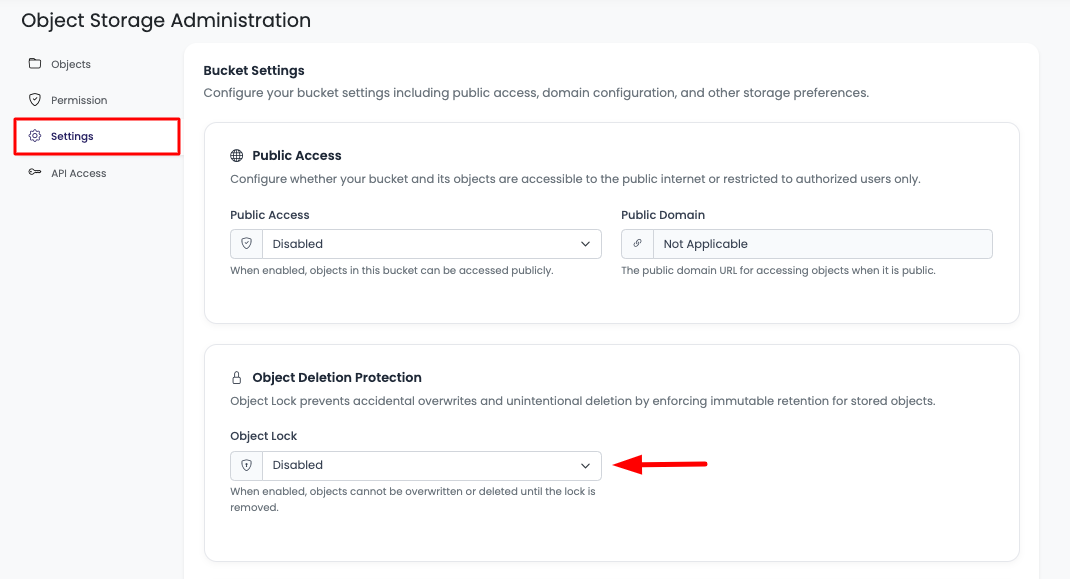
This is the section from where you can control object lock behavior for the bucket.
If You Disable Object Lock
Disabling object lock allows object deletion operations. Do this only when required, and with caution.
If objects are deleted while lock is disabled, they cannot be recovered.
Recommended safe workflow:
- Disable object lock only for the shortest possible time.
- Perform the required delete operation carefully.
- Re-enable object lock immediately after the operation completes.
Important Limitation: No Restore After Delete
KloudBean S3 currently does not support bucket versioning.
That means deleted objects cannot be restored.
This is the primary reason Object Deletion Protection exists and is enabled by default: to help you avoid irreversible data-loss scenarios.
Best Practices
- Keep Object Lock enabled for all production buckets.
- Disable it only for deliberate, validated cleanup tasks.
- Review object paths and filters before any bulk delete action.
- Use lifecycle and cleanup policies carefully, with testing in non-production buckets first.
- Communicate deletion windows to your team before disabling protection.
Next Steps
- Learn about Uploading Objects
- Learn about Accessing and Downloading Objects
- Learn about Managing Bucket Permissions