Selecting Server Location
Learn how to choose the optimal server location (datacenter) for your applications on KloudBean. Server location is crucial for performance, user experience, and compliance.
Overview
When you select any cloud provider on KloudBean, the platform offers you all the best locations to launch your server based on that provider's datacenter availability worldwide. It's important to understand that some locations may be available with certain cloud providers but not with others, so you need to choose accordingly based on your selected provider.
Understanding Location Availability
Provider-Specific Locations
Each cloud provider has different datacenter availability:
- Different Coverage: Each provider has datacenters in different regions
- Availability Varies: A location available with one provider may not be available with another
- Best Locations: KloudBean shows you all available locations for your selected provider
- Dynamic Options: Location options change based on your cloud provider selection
Why This Matters
- Plan Ahead: Consider location availability when choosing your cloud provider
- Flexibility: You may need to switch providers if a specific location is required
- Global Reach: Different providers offer different geographic coverage
- Optimization: Choose the provider-location combination that best serves your needs
Selecting Your Server Location
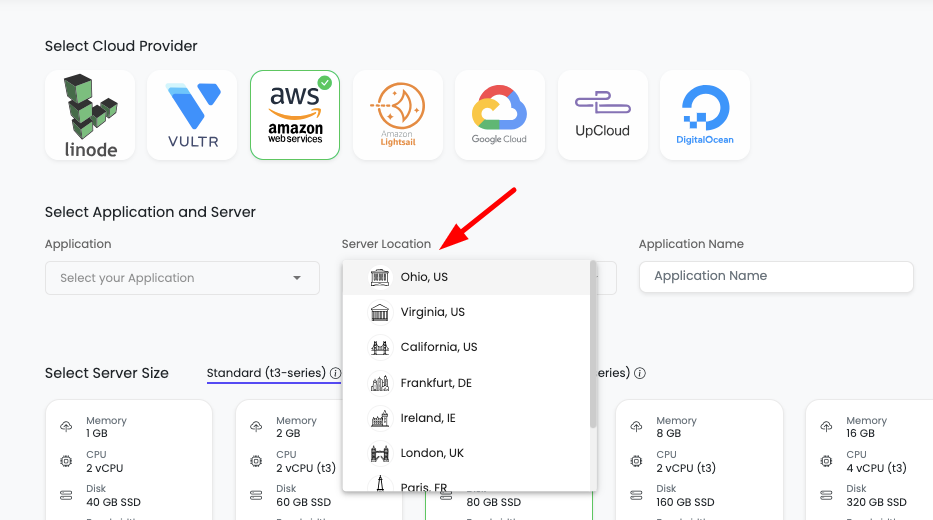
After selecting your cloud provider, you'll see the location selection interface:
Step 1: View Available Locations
- After selecting your cloud provider, the location selection will appear
- You'll see all available datacenter locations for that specific provider
- Locations are typically organized by region (North America, Europe, Asia, etc.)
Step 2: Choose the Nearest Location to Your Users
Most Important Rule: When choosing a datacenter, make sure to choose the nearest location to where most of your users are located.
This is critical for:
- Optimal Performance: Faster response times for your users
- Better User Experience: Reduced latency means better experience
- Lower Costs: Reduced data transfer costs
- Improved SEO: Faster sites rank better in search engines
Why Server Location is Important
1. Latency and Response Time
What is Latency?
- Latency is the time it takes for data to travel from your server to your users
- Measured in milliseconds (ms)
- Lower latency = faster website/app performance
Impact of Distance:
- Close Location: Users experience faster load times (50-100ms)
- Far Location: Users experience slower load times (200-500ms+)
- Example: A server in New York serving users in Tokyo will have much higher latency than a server in Tokyo
Real-World Impact:
- 100ms delay can reduce conversion rates by up to 7%
- 1 second delay can reduce page views by 11%
- 3 second delay can cause 40% of users to abandon your site
2. User Experience
Performance Metrics:
- Page Load Speed: Closer servers = faster page loads
- Time to First Byte (TTFB): Lower latency improves TTFB
- Interactive Response: Faster server responses improve interactivity
- Mobile Performance: Especially important for mobile users on slower connections
User Satisfaction:
- Users expect websites to load in under 2 seconds
- Slow sites lead to higher bounce rates
- Poor performance affects user trust and brand perception
3. Search Engine Optimization (SEO)
Google's Ranking Factors:
- Page Speed: Google considers page speed in search rankings
- Core Web Vitals: Location affects Largest Contentful Paint (LCP) and First Input Delay (FID)
- Mobile-First Indexing: Location is crucial for mobile performance
- Geographic Relevance: Local servers can improve local search rankings
Business Impact:
- Faster sites rank higher in search results
- Better rankings = more organic traffic
- Improved SEO = better business outcomes
4. Data Transfer Costs
Bandwidth Costs:
- Data transfer costs vary by region and provider
- Transferring data over long distances costs more
- Closer servers reduce data transfer distances
- Lower costs = better profit margins
Cost Optimization:
- Choose locations that minimize data transfer costs
- Consider CDN for global content distribution
- Optimize for your primary user base location
5. Compliance and Data Residency
Legal Requirements:
- GDPR (Europe): European data must often be stored in Europe
- Data Protection Laws: Many countries have data residency requirements
- Industry Regulations: Healthcare, finance have specific requirements
- Government Regulations: Some countries require local data storage
Compliance Benefits:
- Legal Compliance: Meet regulatory requirements
- User Trust: Users trust companies that comply with local laws
- Avoid Penalties: Non-compliance can result in fines
- Business Continuity: Compliance ensures uninterrupted operations
6. High Availability and Disaster Recovery
Redundancy:
- Deploy servers in multiple locations for redundancy
- Geographic distribution protects against regional outages
- Natural disasters affect specific regions, not all locations
- Multi-location setup ensures business continuity
Disaster Recovery:
- Backup servers in different regions
- Failover capabilities across regions
- Reduced risk of complete service outage
- Better resilience against infrastructure failures
7. Content Delivery and CDN Integration
CDN Benefits:
- Content Delivery Networks cache content closer to users
- Primary server location still matters for dynamic content
- Origin server location affects CDN performance
- Optimal location improves overall CDN effectiveness
Global Reach:
- Primary server in optimal location
- CDN for static content distribution
- Best of both worlds: performance + global reach
- Cost-effective global content delivery
Location Selection Guide
Step-by-Step Decision Process
-
Identify Your Primary User Base
- Where are most of your users located?
- Analyze your analytics data
- Consider your target market
- Plan for future expansion
-
Check Provider Availability
- Review available locations for your selected provider
- Some providers have better coverage in certain regions
- Consider switching providers if needed location isn't available
-
Measure Latency
- Use tools to test latency from different regions
- Consider using KloudBean's latency testing tools
- Test from your primary user locations
- Choose location with lowest average latency
-
Consider Compliance
- Check data residency requirements
- Ensure location meets legal requirements
- Consider industry-specific regulations
- Plan for compliance from the start
-
Evaluate Costs
- Compare pricing across regions
- Consider data transfer costs
- Factor in total cost of ownership
- Balance performance with cost
-
Plan for Growth
- Consider future user base expansion
- Plan for multi-region deployment
- Design for scalability
- Think long-term strategy
Common Location Scenarios
Scenario 1: US-Based Users
- Best Locations: US East, US West, US Central
- Providers: All major providers have strong US presence
- Considerations: Choose based on specific US region
Scenario 2: European Users
- Best Locations: UK, Germany, France, Netherlands
- Providers: DigitalOcean, Linode, AWS, GCP all have European datacenters
- Considerations: GDPR compliance, choose EU-based locations
Scenario 3: Global Users
- Best Locations: Multiple regions or use CDN
- Providers: AWS, GCP have best global coverage
- Considerations: Primary location + CDN, or multi-region deployment
Scenario 4: Asian Users
- Best Locations: Singapore, Japan, India, Australia
- Providers: Vultr, AWS, GCP have strong Asian presence
- Considerations: Choose based on specific Asian country
Best Practices
- ✅ Choose Nearest Location: Always prioritize proximity to your users
- ✅ Test Latency: Measure actual latency before deciding
- ✅ Consider Compliance: Meet all legal and regulatory requirements
- ✅ Plan for Scale: Consider future expansion needs
- ✅ Use Analytics: Base decisions on real user data
- ✅ Monitor Performance: Track performance metrics by location
- ✅ Consider CDN: Use CDN to complement server location
- ✅ Multi-Region: Plan for multi-region deployment if needed
Troubleshooting
Location Not Available
- Check Provider: Some locations may not be available with your selected provider
- Switch Provider: Consider switching to a provider with your needed location
- Contact Support: Reach out to KloudBean support for assistance
- Alternative Locations: Consider nearby alternative locations
High Latency Issues
- Verify Location: Ensure you selected the closest location
- Test Connectivity: Check network connectivity to the region
- Use CDN: Implement CDN to reduce latency for static content
- Optimize Application: Optimize your application for better performance
Compliance Concerns
- Review Requirements: Verify all compliance requirements
- Choose Appropriate Location: Select location that meets requirements
- Consult Legal: Consult with legal team if unsure
- Document Decisions: Keep records of location selection rationale
Next Steps
After selecting your server location:
- Learn about Selecting Server Size
- Review Creating a New Server
- Explore Adding Application to Server