Selecting Server Size
Learn how to choose the correct server size for your applications on KloudBean. Proper server sizing is crucial for meeting application requirements and ensuring optimal performance.
Overview
When you're going to add a new server from the KloudBean dashboard, one of the most important decisions is choosing the correct server size to meet your application requirements. The server size you select directly impacts your application's performance, ability to handle traffic, and overall user experience.
Development vs Production Servers
Development Servers
For development and testing environments:
- Small Size Recommended: You can go with a small server size for development
- Cost Effective: Smaller sizes are more cost-effective for non-production use
- Sufficient Resources: Development workloads typically require fewer resources
- Testing Environment: Perfect for testing applications before production deployment
Production Servers
For production applications:
- Meet Requirements: Server size must meet your application's actual requirements
- Handle Traffic: Must be able to handle expected traffic loads
- Performance Critical: Production servers need adequate resources for optimal performance
- User Experience: Proper sizing ensures good user experience
Selecting Server Size
When configuring your server, you'll see the server size selection interface:
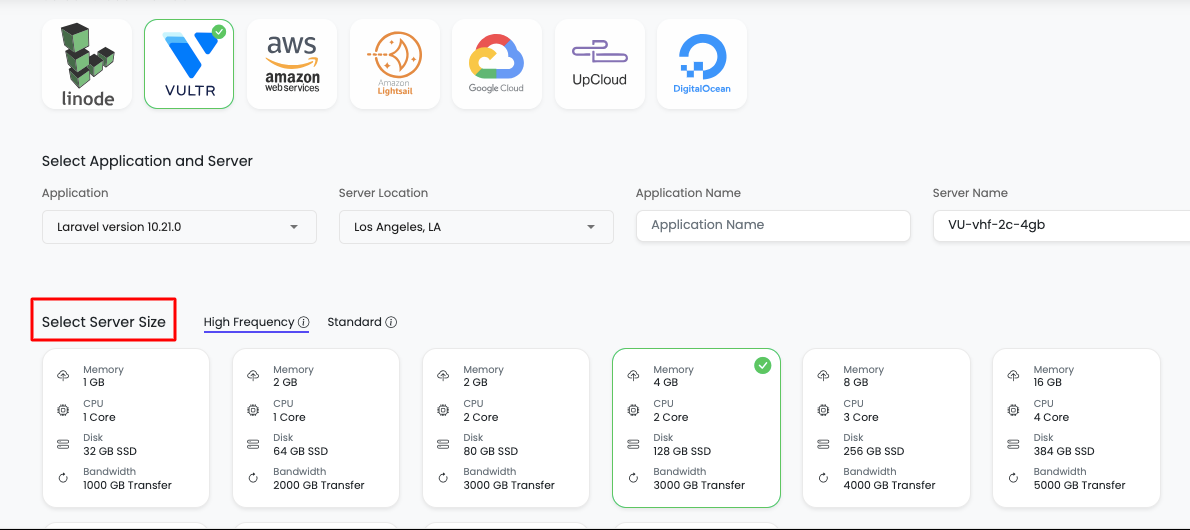
Available Server Sizes
KloudBean provides server sizes ranging from 1GB to 128+ GB, depending upon your needs, application type, and traffic size. This wide range allows you to choose the perfect size for your specific requirements.
Server Size Options
- 1GB: Smallest size, suitable for very light applications
- 2GB: Entry-level production size
- 4GB: Standard size for most applications
- 8GB: Mid-range size for moderate traffic
- 16GB: Large size for high-traffic applications
- 32GB+: Enterprise-level sizes for very high traffic
- 64GB+: Premium sizes for extremely high traffic
- 128GB+: Maximum sizes for enterprise and high-scale applications
Application-Specific Size Recommendations
Rough Size Estimates
Here are minimum server size recommendations for different application types:
Web Applications
WordPress
- Minimum: 2GB
- Recommended: 4GB for production
- High Traffic: 8GB+ for sites with significant traffic
WooCommerce
- Minimum: 4GB
- Recommended: 8GB for production stores
- High Traffic: 16GB+ for large e-commerce sites
PHP Applications
- Small Apps: Minimum 2GB
- Medium Apps: 4GB recommended
- Large Apps: 8GB+ for complex applications
Node.js Applications
- Minimum: 4GB
- Recommended: 8GB for production
- High Traffic: 16GB+ for high-concurrency applications
Python Applications
- Minimum: 4GB
- Recommended: 8GB for production
- Data-Intensive: 16GB+ for machine learning or data processing
Development Tools
n8n (Workflow Automation)
- Minimum: 2GB recommended
- Production: 4GB+ for active workflows
Supabase (Backend Platform)
- Minimum: 4GB recommended
- Production: 8GB+ for production databases
Listmonk (Newsletter Manager)
- Minimum: 2GB
- Recommended: 4GB for active mailing lists
Other Tools
- Size varies depending upon the specific tool
- Check tool documentation for specific requirements
- Consider expected usage and data volume
Why Choosing the Correct Server Size is Important
1. Application Performance
Impact of Correct Sizing:
- Optimal Performance: Applications run smoothly with adequate resources
- Fast Response Times: Sufficient CPU and RAM ensure quick response times
- No Resource Contention: Applications don't compete for limited resources
- Stable Operation: Consistent performance under normal load
Impact of Undersizing:
- Slow Performance: Applications become sluggish and unresponsive
- High Response Times: Requests take longer to process
- Resource Exhaustion: CPU or memory becomes fully utilized
- Application Crashes: Server may crash under load
2. Traffic Handling Capability
Impact of Correct Sizing:
- Handle Expected Traffic: Server can handle your normal traffic load
- Peak Traffic Support: Can handle traffic spikes without issues
- Concurrent Users: Supports multiple simultaneous users
- Scalable Foundation: Provides room for growth
Impact of Undersizing:
- Traffic Limitations: Server cannot handle expected traffic
- Service Degradation: Performance degrades as traffic increases
- User Experience Issues: Slow loading times frustrate users
- Potential Downtime: Server may become unresponsive during traffic spikes
3. Database Performance
Impact of Correct Sizing:
- Fast Queries: Database queries execute quickly
- Efficient Caching: Sufficient RAM for database caching
- Concurrent Connections: Handles multiple database connections
- Data Processing: Efficient data processing and storage
Impact of Undersizing:
- Slow Queries: Database queries take longer to execute
- Cache Limitations: Insufficient RAM limits caching effectiveness
- Connection Issues: May reject connections when overloaded
- Data Corruption Risk: Risk of data issues under memory pressure
4. User Experience
Impact of Correct Sizing:
- Fast Page Loads: Pages load quickly for users
- Smooth Interactions: Interactive elements respond immediately
- Reliable Service: Consistent availability and performance
- User Satisfaction: Users have positive experience
Impact of Undersizing:
- Slow Page Loads: Users experience long loading times
- Poor Interactivity: Buttons and forms respond slowly
- Frequent Errors: Users encounter errors and timeouts
- User Frustration: Poor experience leads to user abandonment
5. Cost Efficiency
Impact of Correct Sizing:
- Optimal Cost: Pay for what you need, no more, no less
- No Over-Provisioning: Avoid paying for unused resources
- No Under-Provisioning: Avoid performance issues that cost business
- ROI Maximization: Best return on investment
Impact of Undersizing:
- Hidden Costs: Performance issues cost more in lost business
- Emergency Scaling: May need urgent upgrades at premium costs
- Business Impact: Lost revenue from poor performance
- Support Costs: More support tickets and troubleshooting
6. Security and Stability
Impact of Correct Sizing:
- Stable Operation: Server operates reliably
- Security Resources: Sufficient resources for security measures
- Backup Capabilities: Can run backups without impacting performance
- Monitoring Overhead: Resources available for monitoring tools
Impact of Undersizing:
- Instability: Server may become unstable under load
- Security Risks: Limited resources may compromise security measures
- Backup Issues: Backups may fail or impact performance
- Monitoring Gaps: Monitoring tools may not function properly
7. Scalability and Growth
Impact of Correct Sizing:
- Growth Ready: Server can accommodate growth
- Smooth Scaling: Easier to scale up when needed
- Performance Headroom: Room for traffic increases
- Future-Proof: Can handle future requirements
Impact of Undersizing:
- Immediate Limitations: Hit resource limits quickly
- Urgent Scaling: Need immediate upgrades to handle growth
- Performance Bottlenecks: Constantly hitting resource limits
- Growth Constraints: Limits ability to grow and expand
Real-World Impact Examples
Example 1: WordPress Site with 2GB vs 4GB
2GB Server (Undersized):
- Slow page loads (3-5 seconds)
- Database queries timeout during traffic spikes
- Users experience frequent errors
- High bounce rate (60%+)
- Poor SEO rankings
4GB Server (Correctly Sized):
- Fast page loads (1-2 seconds)
- Smooth database operations
- Reliable user experience
- Low bounce rate (20-30%)
- Better SEO performance
Example 2: E-commerce Store with 4GB vs 8GB
4GB Server (Undersized):
- Checkout process fails during peak hours
- Product pages load slowly
- Shopping cart errors
- Lost sales during traffic spikes
- Customer complaints
8GB Server (Correctly Sized):
- Smooth checkout process
- Fast product page loads
- Reliable shopping cart
- Handles peak traffic
- Higher conversion rates
KloudBean's Official Recommendation
Start Small, Scale Up
KloudBean's Official Recommendation: At the start, you can go with a small server size and slowly increase the server size as your traffic increases.
Why This Approach Works:
- Cost Effective: Start with lower costs
- Learn and Optimize: Understand your actual resource needs
- Monitor Usage: Track real resource consumption
- Scale Based on Data: Make scaling decisions based on actual usage
- Avoid Over-Provisioning: Don't pay for resources you don't need yet
Scaling Strategy:
- Start Small: Begin with minimum recommended size for your application
- Monitor Performance: Track CPU, memory, and traffic metrics
- Identify Bottlenecks: Watch for performance issues
- Scale Gradually: Increase size as traffic and usage grow
- Optimize Continuously: Regularly review and adjust
When to Scale Up
Consider scaling up when you experience:
- Consistent High CPU Usage: CPU consistently above 70-80%
- Memory Pressure: RAM usage consistently above 80%
- Performance Degradation: Noticeable slowdown in application
- Traffic Growth: Sustained increase in traffic
- User Complaints: Users reporting slow performance
Upscaling Your Server
How to Upgrade Server Size
You can upscale your server anytime by contacting KloudBean support:
-
Contact Support: Reach out to KloudBean support team via:
- Live Chat: Available 24/7
- Email: Support email
- Support Ticket: Create a ticket from dashboard
-
Specify Requirements:
- Current server size
- Desired server size
- Reason for upgrade
- Timeline requirements
-
Support Assistance:
- Support team will guide you through the process
- They'll help you choose the right size
- They'll handle the upgrade process
- Minimal or no downtime during upgrade
-
Upgrade Process:
- Support will coordinate the upgrade
- Server will be resized
- You'll be notified when complete
- New resources will be available immediately
Upgrade Considerations
- Downtime: Most upgrades have minimal downtime
- Data Safety: Your data is safe during upgrades
- Cost Impact: Understand new pricing before upgrading
- Performance: Immediate improvement after upgrade
Premium Support Benefit
KloudBean Premium Support
Benefit of Larger Servers: One significant benefit of choosing a bigger server size (8GB+) is that you get KloudBean Premium Support.
Premium Support Includes:
- Priority Support: Faster response times
- Dedicated Support: Enhanced support experience
- Expert Assistance: Access to senior support engineers
- Proactive Monitoring: Enhanced monitoring and alerts
- Performance Optimization: Help with performance tuning
- 24/7 Availability: Round-the-clock premium support
Server Sizes Eligible for Premium Support:
- 8GB and Above: All servers with 8GB or more RAM
- Enterprise Plans: Higher-tier server configurations
- Custom Configurations: Large custom server setups
Best Practices
- ✅ Start Small: Begin with minimum recommended size
- ✅ Monitor Usage: Track resource consumption regularly
- ✅ Scale Gradually: Increase size as traffic grows
- ✅ Test Performance: Test under expected load
- ✅ Plan for Growth: Consider future requirements
- ✅ Review Regularly: Adjust size based on actual usage
- ✅ Use Monitoring: Leverage KloudBean monitoring tools
- ✅ Contact Support: Reach out for sizing guidance
Troubleshooting
Performance Issues
- Slow Performance: May indicate need for larger server size
- High Resource Usage: Monitor CPU and memory usage
- Traffic Spikes: Consider larger size for peak traffic
- Database Issues: May need more RAM for database operations
Cost Optimization
- Over-Provisioned: If resources are consistently underutilized, consider downsizing
- Under-Provisioned: If experiencing performance issues, consider upgrading
- Right-Sizing: Find the balance between performance and cost
Next Steps
After selecting your server size:
- Review Creating a New Server
- Learn about Adding Application to Server
- Explore Server Management