Enabling Affiliate Program
Learn how to enable and manage your KloudBean affiliate program to earn commissions by referring new customers. Join the KloudBean Affiliate Program and start earning passive income.
Overview
Once you have an account with KloudBean, you have the option to adopt the KloudBean Affiliate Program where you can have a referral link to onboard users on KloudBean and get your commission. All affiliate-related information is available on the KloudBean website. In this article, we will discuss how you can enable the affiliate program.
About KloudBean Affiliate Program
The KloudBean Affiliate Program allows you to:
- Earn Commissions: Get up to $500 as a bonus plus 10% lifetime monthly commissions for every referral
- Passive Income: Earn recurring commissions on every customer you bring onboard
- Real-Time Tracking: Monitor your referrals and commissions in real-time
- Marketing Tools: Access banners, templates, and custom landing pages
👉 To know more about the affiliate program, visit the KloudBean Affiliate Program page.
Accessing Affiliate Program Settings
To enable the affiliate program:
- Log in to your KloudBean account
- From the account settings, navigate to the Affiliate tab
- This will take you to the "Affiliate Partner Program" section
Enabling the Affiliate Program
Step 1: Become an Affiliate Partner
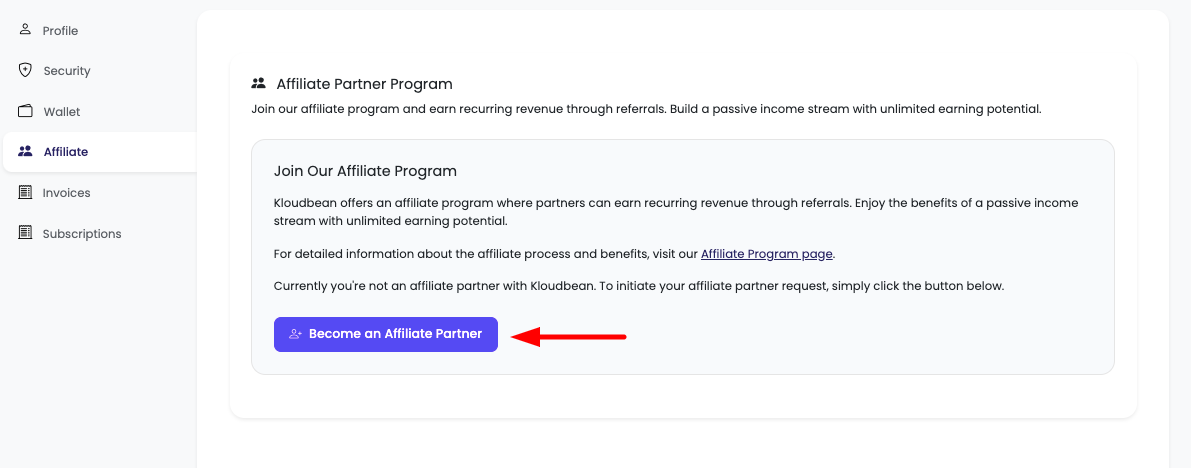
On the Affiliate Partner Program section, you will see a button to simply enable this by clicking on the button "Become an Affiliate Partner".
Step 2: Request Submission
Once you click this button:
-
Request Initiated:
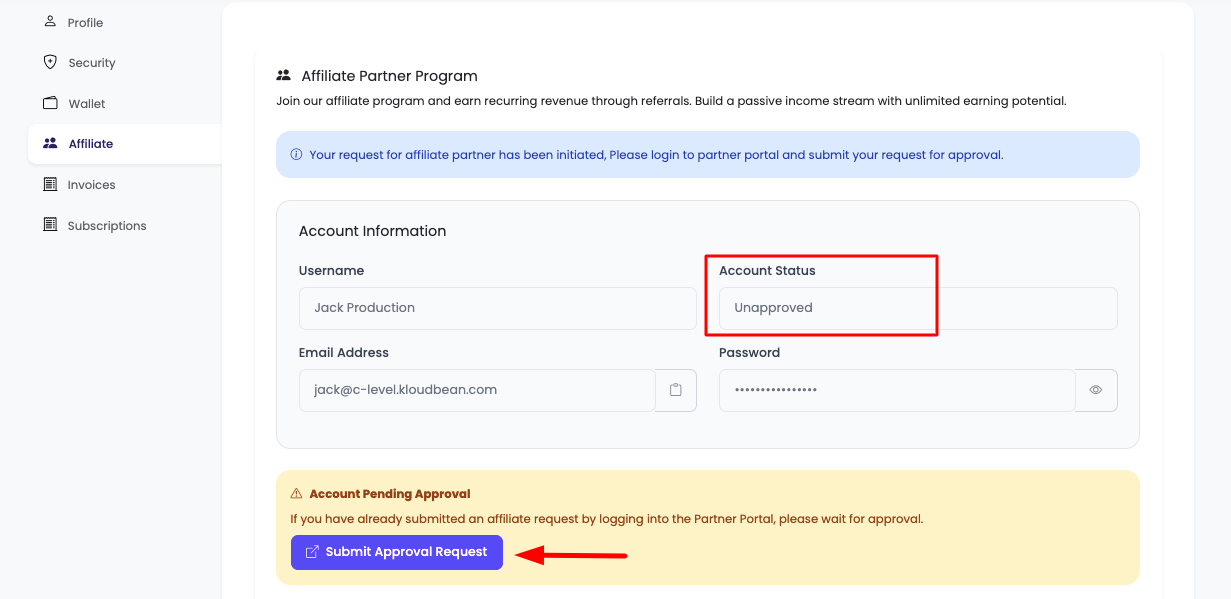
- Your request to become an affiliate partner has been initiated for review by KloudBean administration
- The request is sent to the KloudBean team for approval
-
Account Status:
- At this step, your affiliate account is created but not approved yet
- Your account is in pending status, awaiting administrative review
Step 3: Review Partner Status
While waiting for approval:
- Continue to Review: You can continue to review your partner status by clicking the link given on this page
- Pending Status: Your status will show as "Pending" or "Under Review"
- No Commissions Yet: You won't be able to earn commissions until approval
If Approval Takes Time
If you don't get approved for some time:
-
Reach Out to Support:
- You can reach out to KloudBean support via chat or email
- Mention this explicitly that you're waiting for affiliate approval
- Support team can check the status and expedite if needed
-
24/7 Support:
- KloudBean offers 24/7 support
- Contact support through:
- Live chat from dashboard
- Email: [email protected]
- Support tickets
After Approval: Active Affiliate Status
Once the request is approved, you are good to get benefits from the affiliate program.
Active Status Display
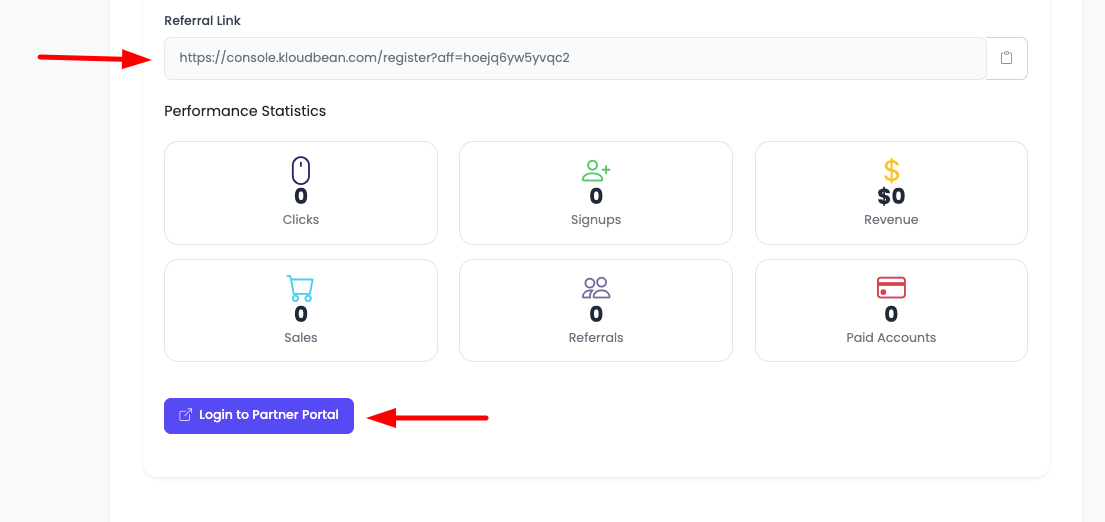
Your affiliate partner status will be shown as "Active" with the following information:
Affiliate Details Available
When your status is active, you'll have access to:
-
Referral Link:
- Your unique affiliate referral link
- Share this link to refer new customers
- Format:
https://www.kloudbean.com/?ref=YOUR_AFFILIATE_ID
-
Clicks:
- Track how many people clicked on your referral link
- Monitor click-through rates
- Analyze which channels drive the most clicks
-
Signups:
- See how many users signed up through your link
- Track conversion from clicks to signups
- Monitor signup trends over time
-
Revenue:
- View total revenue generated from your referrals
- See commission earnings
- Track revenue growth
-
Referrals:
- List of all your referrals
- Status of each referral (active, pending, etc.)
- Referral details and history
Accessing Partner Portal
Login to Partner Portal
You can also login to the affiliate partner portal by clicking on the button "Login to Partner Portal".
-
Access Portal:
- Click the "Login to Partner Portal" button
- This will take you to the dedicated affiliate partner portal
-
Use Credentials:
- Use the credentials given on this section
- Login to the partner portal with your affiliate account credentials
-
Portal Features:
- Access advanced affiliate dashboard
- View detailed analytics and reports
- Manage marketing materials
- Track performance metrics
- Download reports and statements
Affiliate Program Benefits
Commission Structure
Based on the KloudBean Affiliate Program:
- Sign-Up Bonus: Earn up to $500 as a bonus
- Recurring Commissions: 10% lifetime monthly commissions
- High Commission Rates: Earn up to 20-50% recurring commission (varies by tier)
- Lifetime Earnings: Continue earning as long as your referrals remain active
Program Features
- Real-Time Analytics: Track referrals and commissions in real-time
- Marketing Tools: Access banners, templates, and custom landing pages
- Dedicated Support: 24/7 affiliate support to help you succeed
- Fast Payouts: Get commissions quickly through seamless payment system
- Cookie Duration: 90-day tracking cookies ensure you get credit for referrals
Payment Terms
- Payment Threshold: Minimum $100 before payout
- Payment Schedule: Monthly payments processed within 15 days after month ends
- Payment Methods: PayPal or bank transfer
- Use for Services: You can transfer affiliate commissions to pay for your KloudBean services
Sharing Your Affiliate Link
Methods to Share
Once you have your referral link, you can share it through:
- Social Media: Share on Twitter, LinkedIn, Facebook, Instagram
- Blog Posts: Include in your blog articles and reviews
- Email: Send to your email list and newsletters
- Website: Add to your website or landing pages
- Direct Referrals: Share directly with potential customers
- Video Content: Include in YouTube videos and tutorials
Best Practices
- Be Transparent: Disclose affiliate relationships transparently
- Provide Value: Share genuine recommendations and helpful content
- Follow Guidelines: Adhere to FTC guidelines and disclosure requirements
- Track Performance: Monitor which channels drive the most referrals
- Optimize Strategy: Adjust your approach based on performance data
Tracking Your Performance
Affiliate Dashboard
Monitor your affiliate performance:
- Total Referrals: Number of users who signed up via your link
- Active Referrals: Referrals who are currently using KloudBean
- Total Commissions: Earnings from your referrals
- Pending Commissions: Commissions awaiting payment
- Conversion Rate: Percentage of referrals who become customers
- Click-Through Rate: Percentage of clicks that result in signups
Real-Time Analytics
- Track clicks, signups, and revenue in real-time
- View detailed reports and analytics
- Monitor performance trends
- Identify best-performing channels
Troubleshooting
Approval Issues
- Pending Status: If approval takes longer than expected, contact support
- Rejected Application: Review reasons and contact support for clarification
- Account Issues: Ensure your KloudBean account is in good standing
Referral Tracking Issues
- Missing Referrals: Contact support with referred customer's email and details
- Cookie Issues: Ensure cookies are enabled in browser
- Link Problems: Verify your affiliate link is correct
Payment Issues
- Payment Threshold: Ensure you've reached the $100 minimum threshold
- Payment Delays: Payments are processed within 15 days after month ends
- Payment Method: Ensure your payment details are up to date
Important Notes
Program Guidelines
- Paid Ads: You can promote via paid ads, but ensure compliance with guidelines
- Brand Keywords: Unauthorized bidding on brand keywords may result in suspension
- Trademark Use: Follow guidelines for using KloudBean trademarks
- Misleading Advertising: Avoid misleading claims or false advertising
Referral Eligibility
- Pending Status: Referrals are marked as pending until customer fully activates account
- Payment Obligations: Customer must clear payment obligations for commission
- Trial Periods: Trials and incomplete upgrades may not be eligible for commissions
- 90-Day Cookie: Referrals must convert within 90 days of clicking your link
Next Steps
After enabling your affiliate program:
- Learn about Managing Wallet
- Explore Viewing Invoices
- Review Viewing Subscriptions
- Visit the KloudBean Affiliate Program page for more details