Upgrading to the Enterprise Plan
Learn how to move your KloudBean account to the Enterprise plan. Enterprise unlocks dedicated DevOps and operational support, private VPC and dedicated resources, advanced security and compliance offerings, and much more. Because Enterprise is a tailored engagement, you request it as an add-on and the KloudBean team follows up with you after a short review.
Overview
Every KloudBean account starts on the Standard plan, and you can move up to Premium or Enterprise whenever your needs grow. Enterprise is different from a simple plan switch: it is a custom, managed engagement designed around your infrastructure, security, and compliance requirements. For that reason, upgrading to Enterprise is done by requesting the Enterprise add-on, after which the KloudBean team reviews your request and reaches out to finalize the details.
To learn what the plan delivers before you request it, see What's Included in the Enterprise Plan.
Prerequisites
Before requesting an Enterprise upgrade, ensure you have:
- An Active KloudBean Account: You must be logged in to your account.
- Account Access: You need permission to manage your account's subscription and add-ons.
- An Idea of Your Requirements: Having a rough sense of your workloads, security, and compliance needs helps the KloudBean team scope the engagement during review.
Requesting the Enterprise Add-On
Follow these steps to submit your Enterprise upgrade request.
Step 1: Open Your Account's Subscription Tier
- Go to Your Account: Log in to KloudBean and open the Account area.
- Open Subscription Tier: Navigate to the Subscription Tier section, where your current plan and available add-ons are shown.
Step 2: Include the Enterprise Add-On
- Find Services & Add-ons: In the Subscription Tier page, locate the "Services & Add-ons" section.
- Click "Include Add-on": This opens the add-on selection.
- Select Enterprise: Choose Enterprise from the available add-ons.
- Submit Your Request: Confirm and submit.
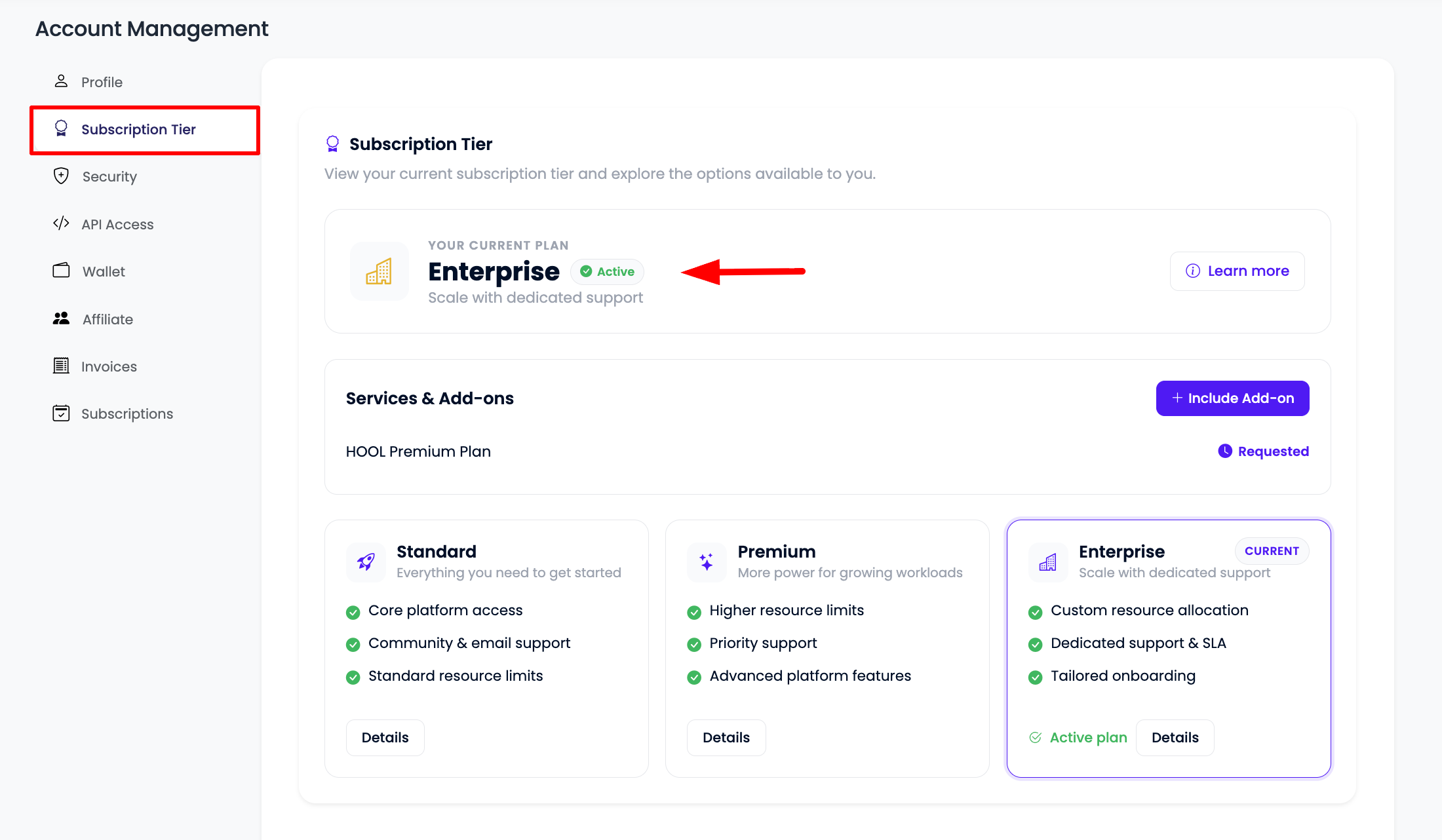
The screenshot above shows where to request the Enterprise add-on. The exact layout may differ slightly as the dashboard evolves, but the path — Account → Subscription Tier → Services & Add-ons → Include Add-on → Enterprise — stays the same.
Step 3: Review by the KloudBean Team
After you submit the request:
- We Review Your Request: The KloudBean team reviews your account and requirements.
- We Reach Out to You: A member of our team will contact you to understand your needs, scope the engagement, and walk you through onboarding.
- Tailored Setup: Enterprise is customized to your organization, so the team confirms details such as dedicated resources, private networking, security, and compliance scope before anything is provisioned.
Submitting the request does not immediately change your billing or provision Enterprise resources. It starts a conversation — pricing, scope, and setup are confirmed with you during the review.
What Happens Next
Once your Enterprise engagement is confirmed:
- A dedicated account manager and DevOps engineer are assigned to your account.
- Your custom infrastructure (private VPC, dedicated resources, secured environment) is planned and set up.
- Any additional offerings you need — such as SIEM security logging, mission-critical managed databases, regional storage buckets, or compliance support — are scoped as part of your engagement.
Troubleshooting
- I don't see the Enterprise add-on: Make sure you are in Account → Subscription Tier → Services & Add-ons. If it still isn't visible, your account role may not have permission to manage add-ons — ask an account owner, or contact support.
- I submitted but haven't heard back: Enterprise requests are reviewed by our team. If you need a faster response, reach out to KloudBean support and reference your Enterprise request.
- I'm not sure Enterprise is right for me: Review What's Included in the Enterprise Plan or contact our team to discuss your requirements before submitting.
Next Steps
- Learn What's Included in the Enterprise Plan.
- Explore the SIEM & Security Logging Plan for compliance-grade security monitoring.
- Review Compliance Support to see how KloudBean helps you meet regulatory requirements.