Limits & Alerts
The Limits & Alerts tab is how you keep spend predictable. It combines daily and monthly spend caps, a rate limit, and a daily request cap — all enforced by the gateway in real time — plus threshold alerts by email and webhook.
Caps
Caps are enforced the moment a request arrives. Exceeding one returns a graceful HTTP 429 instead of a raw throttle, so there are no surprise overages.
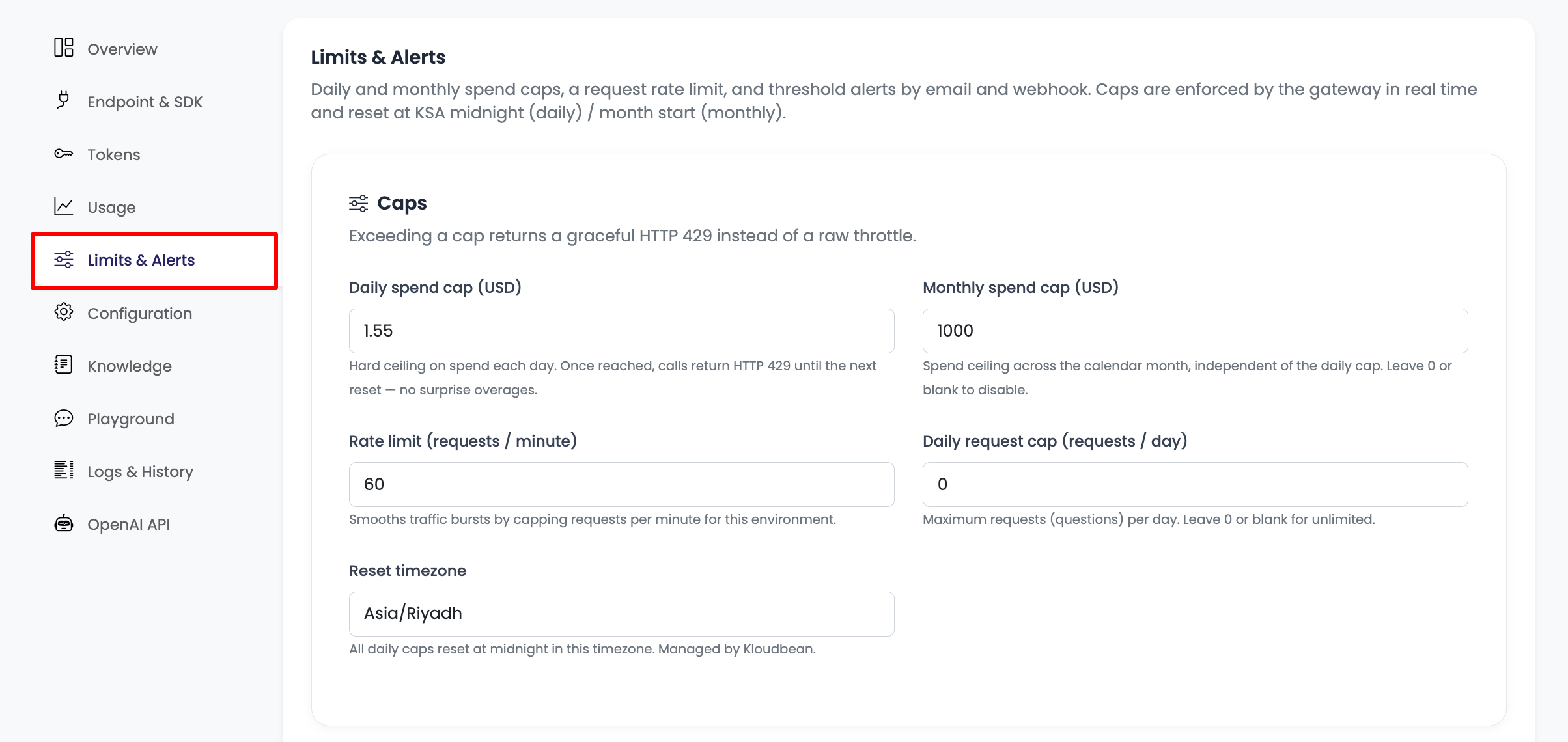
| Control | What it does |
|---|---|
| Daily spend cap (USD) | Hard ceiling on spend each day. Once reached, calls return HTTP 429 until the next reset. |
| Monthly spend cap (USD) | Spend ceiling across the calendar month, independent of the daily cap. Leave 0 or blank to disable. |
| Rate limit (requests / minute) | Smooths traffic bursts by capping requests per minute for the environment. |
| Daily request cap (requests / day) | Maximum requests ("questions") per day. Leave 0 or blank for unlimited. |
| Reset timezone | The timezone daily caps reset in (midnight). Managed by Kloudbean. |
Reset windows
- Daily caps (spend and request count) reset at midnight in the environment's reset timezone (for example
Asia/Riyadh). - The monthly cap resets at the start of each calendar month.
Spend is metered on exactly what Kloudbean pays the provider, per request and per token, so the cap figure reflects real cost.
Alerts
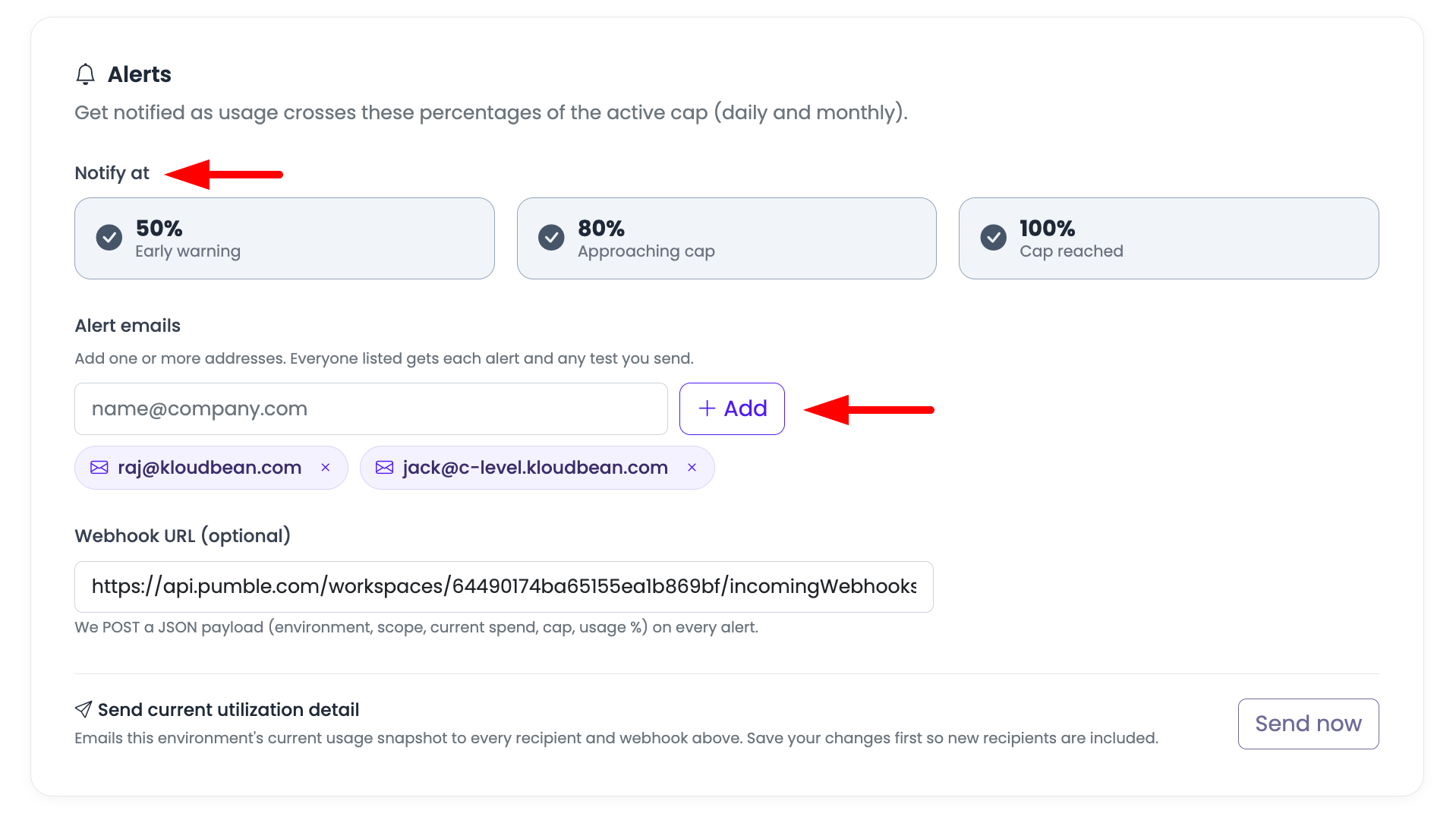
Get notified as usage crosses a percentage of the active cap (daily and monthly), so you hear about it well before anything is blocked.
Thresholds
Choose which thresholds to notify on:
- 50% — Early warning
- 80% — Approaching cap
- 100% — Cap reached
Each selected threshold fires once per period (so a busy environment doesn't spam you).
Alert emails
Add one or more email addresses. Everyone listed receives each threshold alert — and any utilization snapshot you send. Type an address and click Add; remove one with the × on its chip.
Webhook (optional)
Provide a webhook URL to receive alerts programmatically. Kertex POSTs a JSON payload (environment, scope, current spend, cap, and usage %) on every alert. The payload also includes a text summary, so chat tools like Slack, Pumble, Mattermost and Google Chat render it directly. Save the webhook URL before testing.
Send current utilization detail
The Send now button emails this environment's current usage snapshot to every recipient and webhook configured above. Use it to confirm delivery works and to share a point-in-time status. Save your changes first so any newly added recipients are included.
A practical setup
- Set a daily spend cap you're comfortable with as a hard ceiling.
- Add a monthly cap as a backstop across the month.
- Set a rate limit that matches your expected peak traffic.
- Enable the 50 / 80 / 100% alerts.
- Add the emails of whoever owns the budget, plus a webhook to your team chat.
- Click Send now once to confirm alerts arrive.
Next steps
- Developer Guide → — how to handle the
HTTP 429responses caps produce. - API Tokens → — add a per-token daily cap to box in a single integration.