API Tokens
An API token is how your application authenticates to a Kertex AI environment. Each token is authoritative for identity and limits — you create, scope and revoke tokens independently, per environment.
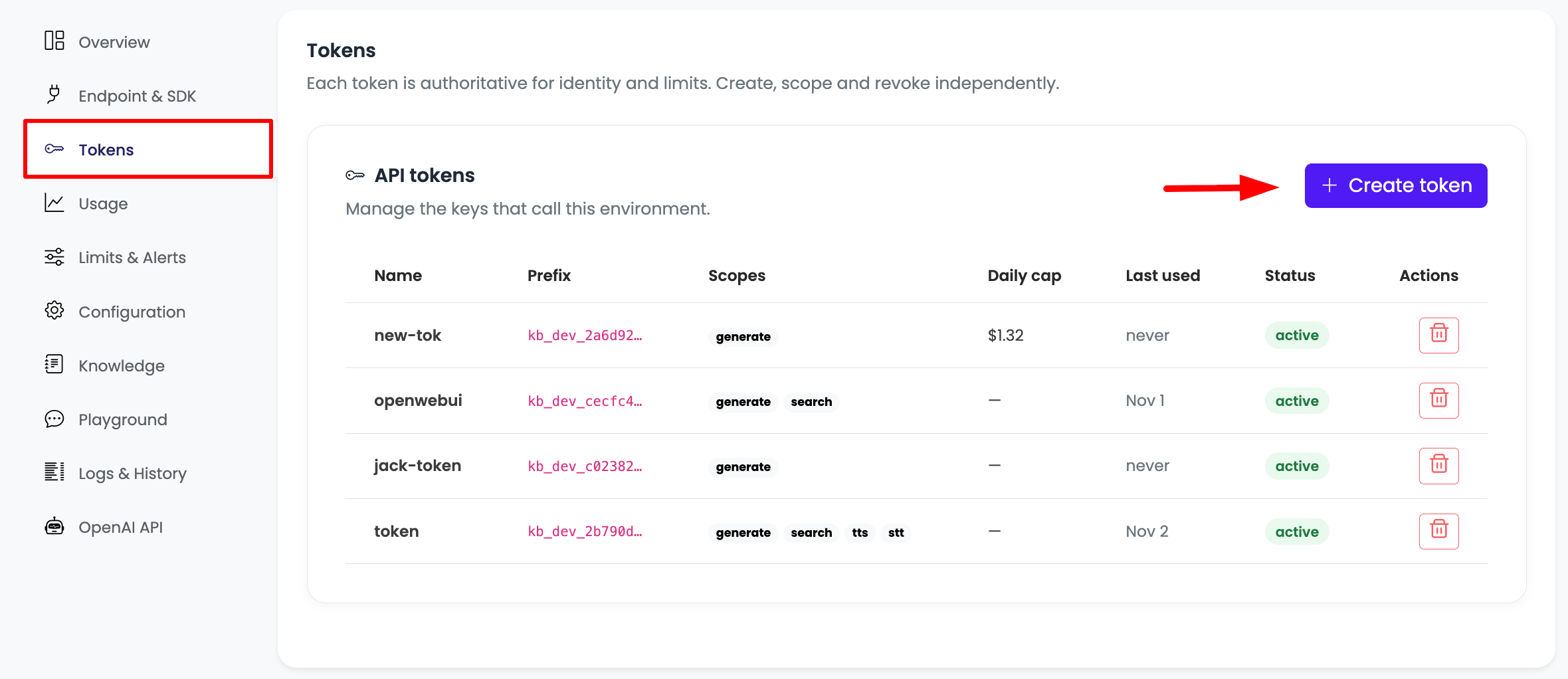
Creating a token
- Open your environment and go to the Tokens tab.
- Click Create token.
- Give it a name (for example
openwebui,backend-prod, or a teammate's name). - Choose its scopes (see below) and, optionally, a per-token daily cap.
- Click create. The full secret is shown only once — copy it immediately and store it somewhere safe. After you close the dialog, only the prefix is ever shown again.
The raw token is displayed a single time, at creation. Kloudbean stores only a hash of it and can never show it again. If you lose it, revoke the token and create a new one.
Token prefixes
Every token carries a short, non-secret prefix that identifies its environment type at a glance:
| Prefix | Environment |
|---|---|
kb_dev_… | Development |
kb_stage_… | Staging |
kb_prod_… | Production |
The prefix is safe to show in logs and dashboards; the rest of the token is the secret.
Scopes
Scopes describe what a token is allowed to do. generate (text/chat generation) is the core scope and is granted by default. Additional scopes such as search, tts and stt can be attached to a token for features that use them. Grant only the scopes a token actually needs.
Per-token daily cap
Alongside the environment-wide spend cap, you can give an individual token its own daily cap. This is useful to box in a single integration or teammate — for example, cap a shared openwebui token at a few dollars a day while the environment cap stays higher.
Using a token
Send the token on each request in any of the ways the Gemini and OpenAI ecosystems expect:
Authorization: Bearer <token>header (OpenAI clients and most HTTP clients)x-goog-api-key: <token>header (Google GenAI SDK)?key=<token>query parameter
See the Developer Guide for full request examples.
Revoking a token
Click the delete (trash) action on a token row to revoke it. Revocation is immediate — Kloudbean purges the token from the gateway's cache the moment you revoke, so it stops working within seconds rather than lingering. Revoke a token whenever it is leaked, no longer needed, or belongs to someone who has left the team.
Good practices
- One token per integration. Separate tokens for your backend, each tool, and each teammate make revocation and metering clean.
- Scope minimally. Only attach the scopes a token needs.
- Cap shared tokens. Put a per-token daily cap on anything shared or experimental.
- Never commit tokens. Keep them in environment variables or a secrets manager, not in source control.
- Rotate periodically. Create a replacement, switch over, then revoke the old one.